

How AI Photo Editing and Creative Tools Are Changing Digital Style and Content Creation
Artificial intelligence has made digital creativity easier and more accessible. People no longer need advanced editing skills or expensive software to experiment with their appearance, create engaging videos, or combine different photographs. Modern AI tools allow users to transform ordinary images into creative content with only a few simple steps.
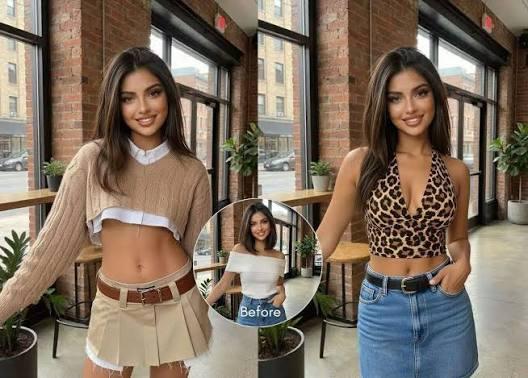
An AI clothes changer is a useful example of this change. It lets users preview different outfits on a photo without taking new pictures or arranging a photoshoot. This can help online shoppers, fashion enthusiasts, content creators, and businesses explore different clothing styles before making a decision.
However, clothing edits are only one part of the growing AI creativity industry. Other technologies can animate photographs, preview hairstyles, create visual references, and combine multiple pictures into a single composition. Understanding these tools can help people find better ways to create professional and attractive digital content.
How AI Clothes Changing Technology Works
Changing clothing in a photograph traditionally required photo editing skills. Editors had to select specific areas, remove existing clothing details, adjust colors, and carefully place new clothing into the image. This process could take considerable time, especially when the original photograph contained complicated lighting or body positions.
AI-powered editing makes this process simpler. A typical virtual outfit workflow uses two images: a photograph of a person and a reference image of the desired clothing. The system analyzes both images and generates a new result that places the selected outfit on the person.
LazyKiwi's AI Clothes Changer follows this approach. Users can upload a personal photograph and a garment image, such as a product photograph, flat lay, or picture of someone wearing the outfit. The tool uses the garment reference to create a virtual try-on while aiming to preserve the person's face, pose, body proportions, and background.
The generated result can be downloaded in 1K or 2K resolution. Users can also provide short styling instructions to guide the result.
Who Can Benefit From Virtual Outfit Editing?
Virtual clothing editing is useful for several types of users.
Online shoppers: Customers can explore how different garments might look on a person before deciding which styles they prefer.
Fashion designers: Designers can experiment with clothing concepts and visual presentations without arranging a complete photoshoot for every idea.
E-commerce businesses: Online stores can create additional product visuals and explore different presentation styles for their clothing collections.
Social media creators: Influencers can develop fashion-related content, outfit comparisons, and styling ideas using digital photographs.
Small businesses: Independent clothing sellers can explore creative product presentation without immediately investing in expensive photography equipment.
Exploring Creative Possibilities With AI Dance Videos
Static photographs are useful, but video content often attracts attention on social media platforms. Short videos can communicate personality, movement, and emotion in ways that ordinary pictures cannot.
An AI dance generator allows users to turn a photograph into an animated dance video. Depending on the tool, users may select a movement template, provide a reference video, or describe the type of animation they want.
This technology can be particularly interesting for:
-
Social media creators developing entertaining short videos.
-
Digital marketers creating promotional content.
-
Artists experimenting with animated characters.
-
Video editors exploring new creative concepts.
-
Individuals who want to animate personal photographs.
For example, a creator might start with a portrait photograph and use an appropriate dance reference to produce a short animated clip. The result can be used as a creative concept for TikTok, Instagram Reels, or YouTube Shorts.
Tips for Better AI Dance Results
The quality of an animated video depends heavily on the original photograph and the movement reference.
Start with a clear image where the subject is visible. Avoid photographs with several people standing close together if the tool is designed for individual subjects. Choose a reference movement that matches the subject's position and body orientation.
It is also important to review the final animation. AI-generated movement can sometimes appear unnatural, especially around hands, feet, and fast body movements. A short preview can help identify these problems before sharing the video.
Creating Better Visual References With AI Feet Generation
Accurate body details are important in digital art, character development, fashion design, and product visualization. Feet are sometimes difficult to draw or edit because their proportions, angles, and positions change depending on the subject's movement.
An AI feet generator can help users create visual references or experiment with different foot designs. Depending on the application, it may generate realistic anatomical references, stylized illustrations, or digital character details.
There are several practical applications for this technology.
Digital illustration: Artists can explore different foot positions and proportions when designing characters.
Character development: Game designers and digital artists can create visual references for fictional characters.
Footwear concepts: Designers can experiment with footwear presentation and understand how different shoes appear from various angles.
Educational visuals: Illustrators can develop simplified anatomical references for drawing and design exercises.
How to Get More Useful Results
A detailed prompt can make a significant difference. Instead of entering a general instruction, explain the intended style, angle, lighting, and visual purpose.
For example, a designer might request a realistic side-view anatomical reference with natural proportions and neutral lighting. Someone creating a cartoon character may prefer simplified shapes, clean outlines, and a colorful illustration style.
Always check the generated image for incorrect proportions or unusual details. AI-generated references are useful starting points, but they should not automatically replace professional anatomical knowledge.
Experimenting With New Looks Through AI Hairstyle Editing
A hairstyle can change the overall appearance of a person. However, choosing a new haircut or hair color can be difficult when someone is unsure how the result will look.
An AI hairstyle changer helps users preview different hairstyles using their own photographs. Instead of relying entirely on imagination, users can explore several possible looks before visiting a salon.
Common hairstyle experiments include:
-
Short haircuts and long hairstyles.
-
Straight, wavy, and curly hair.
-
Different hair colors and highlights.
-
Bangs and layered hairstyles.
-
Modern, classic, and creative haircuts.
This technology can benefit individuals, beauty professionals, hairstylists, and social media creators.
Why Hairstyle Previews Are Useful
For customers, digital previews can make salon consultations more productive. A person can save a few hairstyle examples and discuss them with a professional before making a final decision.
For hairstylists, visual previews can help communicate different ideas. Instead of explaining every detail verbally, they can use example images to understand the customer's preferences.
Beauty content creators can also use hairstyle experiments to produce before-and-after comparisons, tutorials, and styling inspiration.


