


What Should You Know Before Buying HPE Refurbished Servers
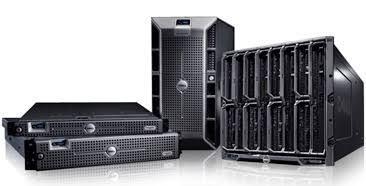
A reliable server can make the difference between smooth business operations and costly downtime. Yet buying enterprise hardware does not always mean purchasing brand-new equipment at premium prices. Refurbished systems can offer strong performance while helping organizations manage technology budgets more effectively. The key is knowing what to inspect, verify, and consider before making a purchase.
Assess Your Requirements
Before comparing used HP servers, start by identifying exactly what your business needs from its infrastructure. Consider workloads, expected user traffic, storage requirements, virtualization plans, and application demands. A server designed for basic file sharing may not be suitable for intensive database or virtualization workloads.
It is also important to think beyond today's requirements. Businesses often grow faster than expected, so choosing equipment with sufficient processing capacity, memory expansion, and drive-bay availability can prevent another hardware investment in the near future. A clear requirements list makes the buying process considerably easier.
Check Hardware Condition
Refurbished equipment can vary significantly depending on how it was tested, restored, and prepared for resale. Look for refurbished server hardware that has undergone documented inspection rather than equipment simply being cleaned and repackaged. The condition of critical components should be clearly communicated before purchase.
Pay particular attention to processors, memory, storage drives, power supplies, fans, and network interfaces. Cosmetic marks may have little effect on performance, while damaged or heavily worn internal components can create genuine reliability concerns. A reputable seller should be willing to explain the condition and testing process.
Verify Server Specifications
A server's model number alone does not tell the whole story. Two systems from the same product family can have very different processors, memory configurations, storage controllers, and expansion options. Compare the exact configuration against your workload before placing an order.
Important specifications to review include:
-
Processor generation, core count, and clock speed
-
Installed RAM and maximum supported memory
-
Drive type, capacity, and storage interface
-
RAID controller capabilities and compatibility
-
Network ports and available expansion slots
Matching specifications to actual workloads helps prevent paying for unnecessary performance while avoiding configurations that cannot handle your applications. This step is especially valuable when comparing several generations of enterprise equipment.
Understand Storage Options
Storage deserves careful attention because it directly affects application performance, capacity, and data availability. Depending on the workload, you may need traditional hard drives, solid-state drives, or a combination of both. Review supported drive formats and determine whether the included controller meets your requirements.
Also check whether drives are new, refurbished, or previously used. Enterprise storage devices can have very different remaining lifespans depending on their history and workload. If the server will hold important business data, confirm the RAID configuration and establish an independent backup strategy rather than relying on redundancy alone.
Evaluate Power Efficiency
Older enterprise servers can deliver excellent computing performance, but power consumption should still be part of the buying decision. A system that appears inexpensive initially may cost considerably more over several years if it requires substantial electricity and cooling.
Consider the server's processor generation, power supplies, workload efficiency, and expected operating hours. For organizations operating several systems, even modest differences in consumption can become significant. Choosing energy-efficient server configurations can help balance acquisition costs with long-term operating expenses.
Review Warranty Coverage
Warranty terms provide important insight into a seller's confidence in the equipment. Before purchasing, find out exactly what is covered, how long the coverage lasts, and what happens if a component fails. Clarify whether replacement parts, labor, shipping, or technical assistance are included.
A strong warranty can reduce the financial risk associated with refurbished equipment. It is also useful to ask about return policies and replacement procedures. Clear terms matter because resolving a hardware issue should be straightforward rather than becoming an unexpected operational challenge.
Consider Future Expansion
Technology requirements rarely remain static. A server that meets today's workload may need additional memory, storage, or networking capacity as the organization expands. This makes upgrade potential an important consideration when choosing HPE refurbished servers for long-term business use.
Look for systems with accessible memory slots, available drive bays, expansion slots, and compatible upgrade paths. Scalable infrastructure allows businesses to increase capacity gradually instead of replacing an entire system whenever requirements change. Planning ahead can make a lower-cost purchase much more valuable over its useful life.
Compare Seller Reputation
The seller is just as important as the hardware itself. Established providers generally offer clearer product descriptions, testing procedures, warranties, and customer support than sellers focused solely on moving inventory. Research reviews and look for evidence of consistent service.
Ask whether systems are tested before shipment and whether configurations can be customized. A knowledgeable provider should also be able to answer technical questions about compatibility, firmware, components, and upgrades. This level of support can make the difference between a successful purchase and an expensive mistake.
Calculate Total Ownership
Purchase price should never be the only financial consideration. Calculate the likely cost of storage upgrades, additional memory, replacement components, electricity, maintenance, and eventual disposal. Comparing these expenses provides a more realistic picture of the investment.
It is also worth considering how quickly the server can deliver value. Cost-effective data center equipment can be particularly attractive when it combines dependable performance with reasonable operating expenses. The goal is not simply to find the lowest price, but to achieve the best balance between reliability, capability, and long-term cost.
Make An Informed Choice
Buying refurbished enterprise hardware can be a practical strategy when the equipment is carefully selected and properly evaluated. Reliable server maintenance should remain part of the plan, including firmware updates, monitoring, backups, and timely replacement of aging components.
The strongest purchase decisions come from matching hardware to real workloads rather than chasing specifications alone. By checking configuration details, condition, storage, warranty coverage, energy use, and future expansion, buyers can significantly reduce uncertainty and make better use of their technology budgets.
Final Thoughts
Choosing refurbished enterprise hardware requires more than finding an attractive price tag. Buyers should evaluate specifications, physical condition, storage, power requirements, warranty protection, and future upgrade options. With careful planning and a trustworthy supplier, refurbished systems can provide dependable performance without placing unnecessary pressure on an IT budget. Cloud Ninjas helps businesses make confident purchasing decisions by focusing on quality equipment, practical infrastructure needs, and long-term value.

 English
 Arabic
 Spanish
 Portuguese
 Deutsch
 Turkish
 Dutch
Dutch
 Italiano
 Russian
 Romaian
 Portuguese (Brazil)
 Greek
Greek